
Open source · MIT · v0.6.68
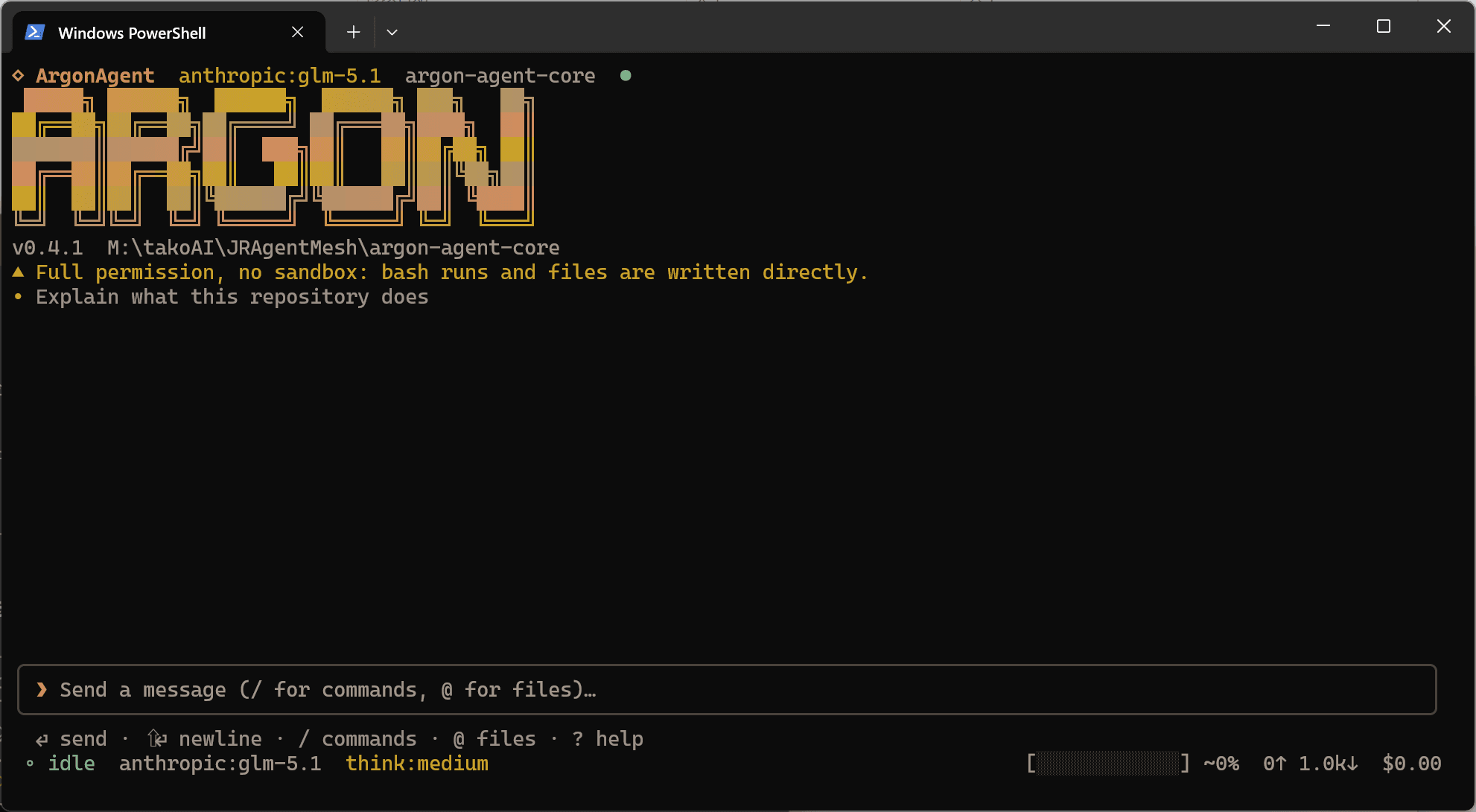
The agentthat lives in your terminal.
A Claude-Code-style TUI, a zero-coupling TypeScript engine, and a machine-facing CLI contract — in one MIT-licensed repo.
npm i -g @aragon-agent/cliNode ≥ 18 · Windows · macOS · Linux
- Anthropic
- OpenAI
3 packages · 1 engine · 0 database coupling
Developer
One account, and the terminal knows it.
Approve once in the browser and the terminal has its own credential — a token you can name, limit and revoke from the console.
CLI sign-in ships next; the protocol and the console are live today. Any client can already follow the two requests on the API page.
Terminal
Any script
curl -H "Authorization: Bearer $ARAGON_TOKEN" https://aragon.example/api/v1/meEverything the terminal needs. Nothing the engine doesn’t.
01
Terminal-native TUI
Full-screen streaming chat, live tool cards and a status bar that tracks context, tokens and cost.
02
Bring your own model
Anthropic, OpenAI and Google adapters with a pluggable registry and retry with backoff on every stream.
03
Team subagents
Parts of a job go to short-lived subagents that run in parallel and return one combined report.
04
Plan mode & governance
A read-only planning mode that investigates first, and a governed team under a separation of powers.
05
Skills
Reusable expert procedures on disk, surfaced through progressive disclosure with a per-skill tool ceiling.
06
Machine contract
aragon exec emits a versioned NDJSON event stream with enforced permissions and stable exit codes.
A governed team is not a bigger prompt.
An orchestrator plans and hands out work, a development, review and test trio carries it out, and an inspector audits the result. No seat holds both the pen and the stamp.
Delegated work is charged in GT against a budget the run has to respect, so a deep tree of subagents cannot quietly spend the whole afternoon on one question.
Every governed run leaves a record that resumes where it stopped — the difference between a demo and something you can leave running overnight.
- ORCHESTRATOR
- DEV · REV · TEST
- INSPECTOR
Three commands to a working agent.
1
npm i -g @aragon-agent/cliInstall the CLI globally so aragon is on your PATH.
2
export ANTHROPIC_API_KEY=sk-ant-...Point it at a provider — or paste the key inside the TUI with /settings.
3
aragonStart the TUI and describe the job in plain English.
Install it, or take the whole engine.
CLI
npm i -g @aragon-agent/clinpx @aragon-agent/cliThe TUI and the engine in one global binary. Use npx to try it without installing anything.
Checksums and release notes →Desktop
The Electron build lives in the repository and has no download host yet.
Watch the repositoryEngine
v0.2.80npm install @aragon-agent/coreSessions, tools and provider adapters you can embed in your own TypeScript program — no database in the box.
Checksums and release notes →Create an account.
Download the desktop build, follow releases, and manage the devices you are signed in on.
- Installer downloads
- Release notes
- Session control
- One account, every platform
- No marketing email — the site does not send any.
Frequently asked questions
Is it really MIT?
Yes. The CLI, the TUI and the engine are MIT licensed and published to npm. There is no closed counterpart and no paid tier.
Do I need an API key?
For a hosted provider, yes — one key for Anthropic, OpenAI or Google. You can also paste it inside the TUI with /settings instead of exporting it.
Which models work?
Anything reachable through the three built-in adapters. The provider registry is pluggable, so a local or hosted endpoint that speaks one of those protocols also works.
Is there a desktop app?
There is a private Electron build in the same repository. Its installer is unsigned and the download host is not chosen yet, so the download page says so rather than offering a dead link.
Does it send my code anywhere?
Only to the model provider you configure, and only what the agent sends in a prompt. The engine holds no database, no telemetry and no analytics endpoint. Be aware of the flip side: tools run on your machine with the full permission of the process — bash executes directly, without a sandbox and without a per-action approval gate, unless you pass --confirm or --permission-mode strict.
What email will I get for my account?
Six transactional messages and nothing else: address confirmation, a change confirmation, a password reset link, "your password was changed", "your address was changed", and a security notice when the address on the account changes or is removed. No newsletters, no receipts, no marketing, no tracking pixel and no remote images — every message is plain HTML with inline styles, which also means we cannot tell whether you opened it.
The confirmation or reset email never arrived. What now?
Check the spam folder first: this deployment sends without DKIM unless the operator configures it, and a brand-new sending domain is treated with suspicion for a while. Delivery is best effort — we guarantee that a message is queued and retried, not that it arrives. If it still has not arrived after a few minutes, wait an hour before asking again: the site sends at most three messages per address per hour, and a request over the limit is dropped silently rather than announced. An administrator can always issue a one-time reset link by hand.
Where do I report a bug?
Open an issue on GitHub. Reproducing the problem there first is the fastest path — the changelog and the CLI README describe the behaviour you are comparing against.